Smart Image Editor
Smart Image Editor — The Complete Guide to Effortless Image Resizing, Cropping, and Compression in WordPress
In today’s fast-paced digital world, website speed, SEO performance, and user experience go hand in hand. One of the most critical factors affecting all three is image optimization. Large, unoptimized images can slow down your site, frustrate your visitors, and even hurt your search rankings.


That’s where Smart Image Editor comes in — a powerful yet incredibly easy-to-use WordPress plugin that lets you resize, crop, compress, and convert images directly from your WordPress Media Library. No external tools. No extra uploads. Just quick, precise, in-dashboard editing.
What Is Smart Image Editor?
Smart Image Editor is a WordPress plugin designed to give you full control over your images without leaving the WordPress admin panel. It’s built for:
Bloggers who want to quickly prepare images for posts.
Photographers needing precise cropping and format control.
E-commerce store owners optimizing product images for faster load times.
Any website owner who values speed, efficiency, and visual quality.
Key Features
1. Manual Image Resizing & Cropping
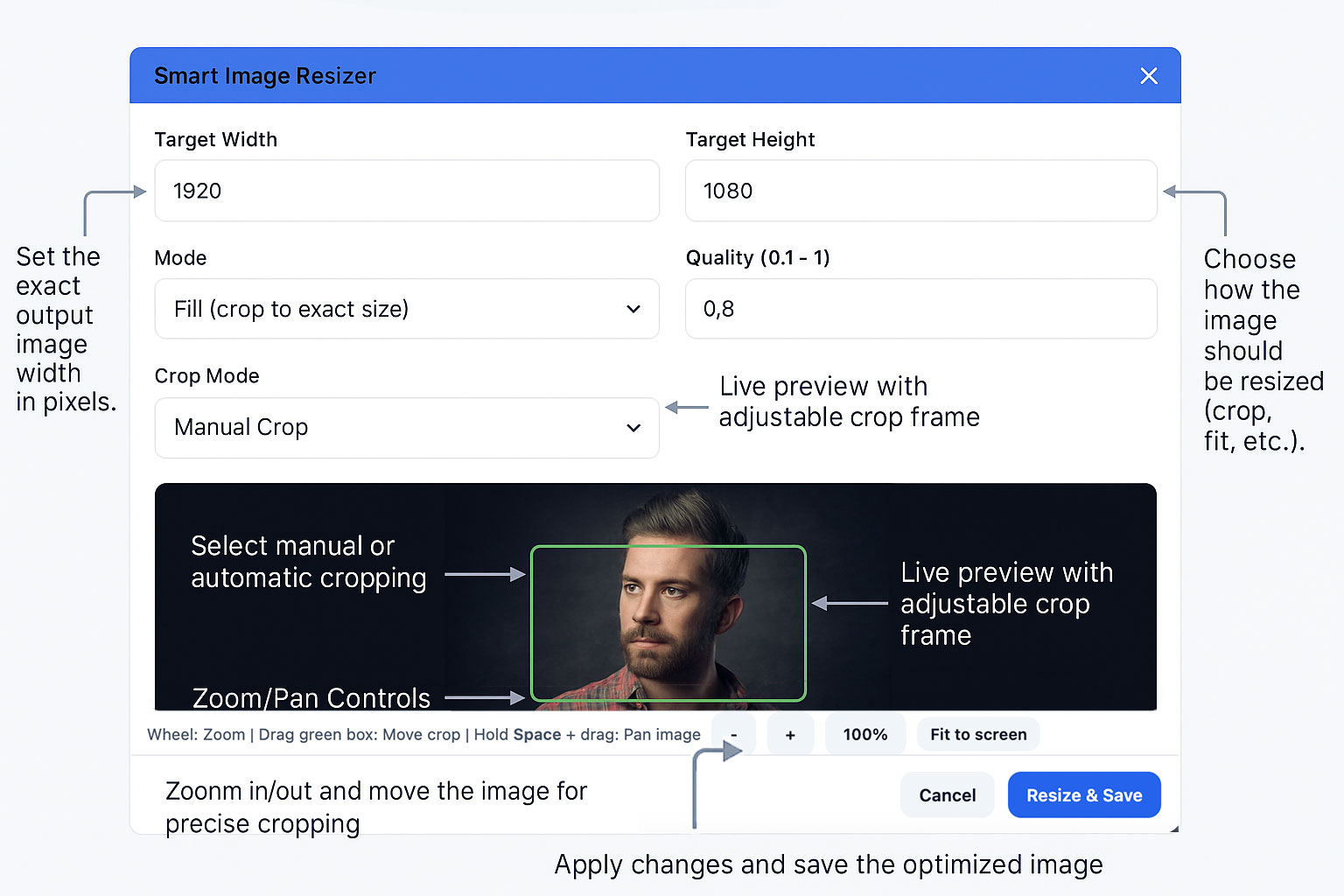
Easily set the exact width and height you need. A dynamic, adjustable cropping frame lets you see exactly which part of the image will remain — no guesswork.
2. Zoom & Pan Support
Working with large, high-resolution images? Smart Image Editor includes built-in zoom and pan controls, so you can focus on the exact area you want to keep.
3. WebP Format Export
Save images in the modern, lightweight WebP format, which can reduce file sizes by up to 30–50% compared to JPEG or PNG — without sacrificing visual quality.
4. Image Compression
Reduce file sizes with lossless or high-quality lossy compression to speed up your site and save server storage.
5. Live Preview
See exactly how your changes will look before saving, so you can make adjustments with confidence.
6. Beginner-Friendly Interface
No need to be a designer or developer. Smart Image Editor’s clean, intuitive interface ensures you can edit images in seconds.
Why Image Optimization Matters
Faster Website Loading — Every extra second of load time can lead to higher bounce rates.
Better SEO Rankings — Google prioritizes websites with fast loading speeds.
Improved User Experience — Visitors stay longer when pages load quickly and images look sharp.
Reduced Bandwidth Costs — Smaller files mean less data transfer.
How It Works
Go to Your Media Library
Click on any image you want to edit.Open Smart Image Editor
Choose “Edit Image” to access resizing, cropping, and compression options.Set Your Dimensions & Format
Enter your target width/height, choose the format (JPEG, PNG, or WebP), and adjust compression quality.Adjust the Cropping Frame
Drag and resize the cropping box, zoom in or out, and position it exactly where you want.Preview & Save
See the live preview, then save the optimized image — either overwrite the original or save as a new file.
Technical Details
Fully Compatible with WordPress 6.8+
Supports JPEG, PNG, and WebP output
Built with modern JavaScript and responsive design
Works seamlessly with the native WordPress Media Library
No external dependencies — everything happens inside your WordPress site
Pro Tips for Best Results
Always export to WebP for maximum speed and SEO benefits.
Use compression quality between 0.7–0.85 for a perfect balance between size and quality.
For product images, stick to consistent aspect ratios for a clean store layout.
Download & Installation
Download Smart Image Editor from WordPress.org.
Install it via Plugins → Add New in your WordPress dashboard.
Activate the plugin.
Start optimizing your images instantly.
Smart Image Editor bridges the gap between speed, quality, and convenience. Instead of juggling multiple tools or wasting time on repetitive image editing tasks, you can now do it all inside WordPress — faster, smarter, and better.
If you want a faster website, better SEO, and a smoother workflow, Smart Image Editor is a must-have.